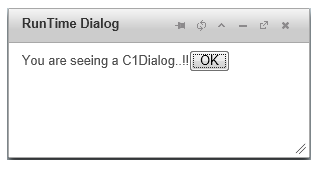
The C1Dialog control can be created and displayed on the client side. In this help, you will place a standard Button control and a standard PlaceHolder control on your page, use code to create the C1Dialog control, and display it using the button_click event.
Complete these steps:
<asp:Content> tag:
To write code in Source View
<!--jQuery References-->
    <script src="http://code.jquery.com/jquery-1.8.2.min.js"
        type="text/javascript"></script>
    <script src="http://code.jquery.com/ui/1.9.1/jquery-ui.min.js"
        type="text/javascript"></script>

        <asp:PlaceHolder runat="server">
    <script type="text/javascript">
        $(document).ready(function () {

            $("#<%=btnShowDialog.ClientID %>").click(function ()
                $("#<%=C1Dialog1.ClientID
        %>").c1dialog("open");
return false;
            });
        });

    </script>

    </asp:PlaceHolder>
To write code in Source View
<asp:Button ID="btnShowDialog" runat="server" Text="Show Dialog Created At Run Time" />
<asp:PlaceHolder ID="C1Dialog1" runat="server"></asp:PlaceHolder>
To write code in Visual Basic
| Visual Basic |
Copy Code
|
|---|---|
Imports C1.Web.Wijmo.Controls.C1Dialog |
|
To write code in C#
| C# |
Copy Code
|
|---|---|
using C1.Web.Wijmo.Controls.C1Dialog; |
|
To write code in Visual Basic
| Visual Basic |
Copy Code
|
|---|---|
Protected Sub btnShow_Click(sender As Object, e As EventArgs) Handles btnShow.Click
        Dim dlg As C1Dialog = New C1Dialog()
        dlg.Title = "RunTime Dialog
        dlg.Modal = True
        dlg.Content = New MyTemplateClass()
        C1Dialog1.Controls.Add(dlg)
    End Sub
|
|
To write code in C#
| C# |
Copy Code
|
|---|---|
protected void btnShow_Click(object sender, EventArgs e)
        {
            C1Dialog dlg = new C1Dialog();
            dlg.Title = "RunTime Dialog";
            dlg.Modal = true;
            dlg.Content = new MyTemplateClass();
            C1Dialog1.Controls.Add(dlg);
        }
|
|
To write code in Visual Basic
| Visual Basic |
Copy Code
|
|---|---|
Public Class MyTemplateClass Implements ITemplate

    Public Sub InstantiateIn(container As Control) Implements ITemplate.InstantiateIn
        Dim label As New Label()
        label.ID = "lblmyLabel"
        label.Text = "You are seeing a C1Dialog..!!"

        Dim btnOK As New Button()
        btnOK.Text = "OK"

        container.Controls.Add(label)
        container.Controls.Add(btnOK)
    End Sub

End Class
|
|
To write code in C#
| C# |
Copy Code
|
|---|---|
public class MyTemplateClass : ITemplate
        {
            public void InstantiateIn(Control container)
            {
                Label label = new Label();
                label.ID = "lblmyLabel";
                label.Text = "You are seeing a C1Dialog..!!";
                Button btnOK = new Button();
                btnOK.Text = "OK";
                container.Controls.Add(label);
                container.Controls.Add(btnOK);
            }
}
|
|