By default, the C1ProgressBar control label displays a label with the current percentage of progress. In this topic, you will customize the label so that it displays a modified string along with the maximum value setting of the control. This topic assumes that you have created an ASP.NET AJAX-Enabled Web site containing a ScriptManager control and a C1ProgressBar control.
Formatting the Label in Design View
Complete the following steps:
Formatting the Label in Source View
Complete the following steps:
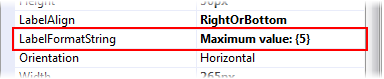
LabelFormatString = 'Maximum Value: {5}' in the <cc1:C1ProgressBar> tag so that the markup resembles the following:<cc1:C1ProgressBar ID="C1ProgressBar1" runat="server" Width="288px" Height="22px" UseEmbeddedVisualStyles="True" VisualStyle="ArcticFox" LabelFormatString="Maximum value: {5}" />Formatting the Label in Code
Complete the following steps:
Visual Basic
| Visual Basic |
Copy Code
|
|---|---|
| Imports C1.Web.Wijmo.Controls.C1ProgressBar | |
C#
| C# |
Copy Code
|
|---|---|
| using C1.Web.Wijmo.Controls.C1ProgressBar; | |
Visual Basic
| Visual Basic |
Copy Code
|
|---|---|
| C1ProgressBar1.LabelFormatString = "Maximum value: {5}" | |
C#
| C# |
Copy Code
|
|---|---|
| C1ProgressBar1.LabelFormatString = "Maximum value: {5}"; | |
 This Topic Illustrates the Following:
In this topic, you created a custom label for the C1ProgressBar control. The following topic illustrates a progress bar with its LabelFormatString property set to 'Maximum Value: {5}'.


