


Filter Expressions
The FilterEditor allows end-users to create complex filter criteria by adding filter combinations and operations as nodes. The TreeView based filtering UI can be attached to any control or information screen. For every operation, the control shows drop-down menu with available options.
Filter Combination
You can create complex filter expressions by adding logical filter combinations using CombinationExpression class which uses FilterCombination Enumeration of C1.DataCollection to add AND/OR logical functions. The table below describes the available logical functions.
Function | Description |
|---|---|
AND | The function returns TRUE if all the arguments are TRUE. |
OR | The function returns TRUE if any argument is TRUE. |
Filter Operation
Further, you need to add the filter operations using OperationExpression class which enables the user to select the property name to which the expression applies, value of filter expression, and type of logical operation according to the selected field type using FilterOperation Enumeration of C1.DataCollection. The table below describes the available logical operators.
Condition | Description |
|---|---|
Equal | Returns the values equal to the entered value. |
NotEqual | Returns the values not equal to the entered value. |
GreaterThan | Returns the values greater than the entered value. |
GreaterThanOrEqual | Returns the values greater than or equal to the entered value. |
LessThan | Returns the values less than the entered value. |
LessThanOrEqual | Returns the values less than or equal to the entered value. |
EqualText | Returns the values equal to the entered text. |
NotEqualText | Returns the values not equal to the entered text. |
Contains | Returns the values containing entered value. |
StartsWith | Returns the values starting with entered value. |
EndsWith | Returns the values ending with entered value. |
IsOneOf | Returns the value one of the entered values. |
The image below shows the creation of filter expression by adding different combinations and operations.
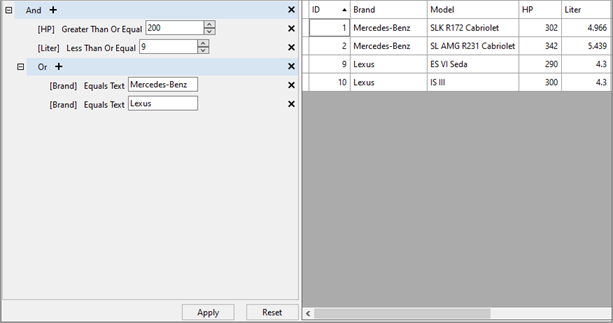
Below code example demonstrates the implementation of Filter Combinations and Operations in FilterEditor as shown in the above scenario.
//Using AND combination
private static CombinationExpression GetPredefinedFilter()
{
  var filterExpression = new CombinationExpression();
  var filterExpressions = filterExpression.Expressions;
  //Adding first operation to AND combination
  var hpGreaterThen200Expression = new OperationExpression()
  {
     PropertyName = "HP",
     FilterOperation = FilterOperation.GreaterThanOrEqual,
     Value = 200
  };
  filterExpressions.Add(hpGreaterThen200Expression);
  //Adding second operation to AND combination
  var literGreaterThen200Expression = new OperationExpression()
  {
     PropertyName = "Liter",
     FilterOperation = FilterOperation.LessThanOrEqual,
     Value = 9
  };
  filterExpressions.Add(literGreaterThen200Expression);
  //Adding new OR combination
  var brandOrExpression = new CombinationExpression();
  brandOrExpression.FilterCombination = FilterCombination.Or;
  var brandExpressions = brandOrExpression.Expressions;
  //Adding first operation to OR combination
  var brandEqualMercedesBenzExpression = new OperationExpression()
  {
      PropertyName = "Brand",
      FilterOperation = FilterOperation.EqualText,
      Value = "Mercedes-Benz"
  };
  brandExpressions.Add(brandEqualMercedesBenzExpression);
  //Adding second operation to OR combination
  var brandEqualAudiExpression = new OperationExpression()
  {
      PropertyName = "Brand",
      FilterOperation = FilterOperation.EqualText,
      Value = "Lexus"
   };
   brandExpressions.Add(brandEqualAudiExpression);
   filterExpressions.Add(brandOrExpression);
   return filterExpression;
}
Apply and Clear Filter
To apply the filter conditions given in example above, FilterEditor provides ApplyFilterAsync method that applies the filter to the data source. You can also use ClearFilter method that removes all the expressions from the filter as shown in the GIF below.
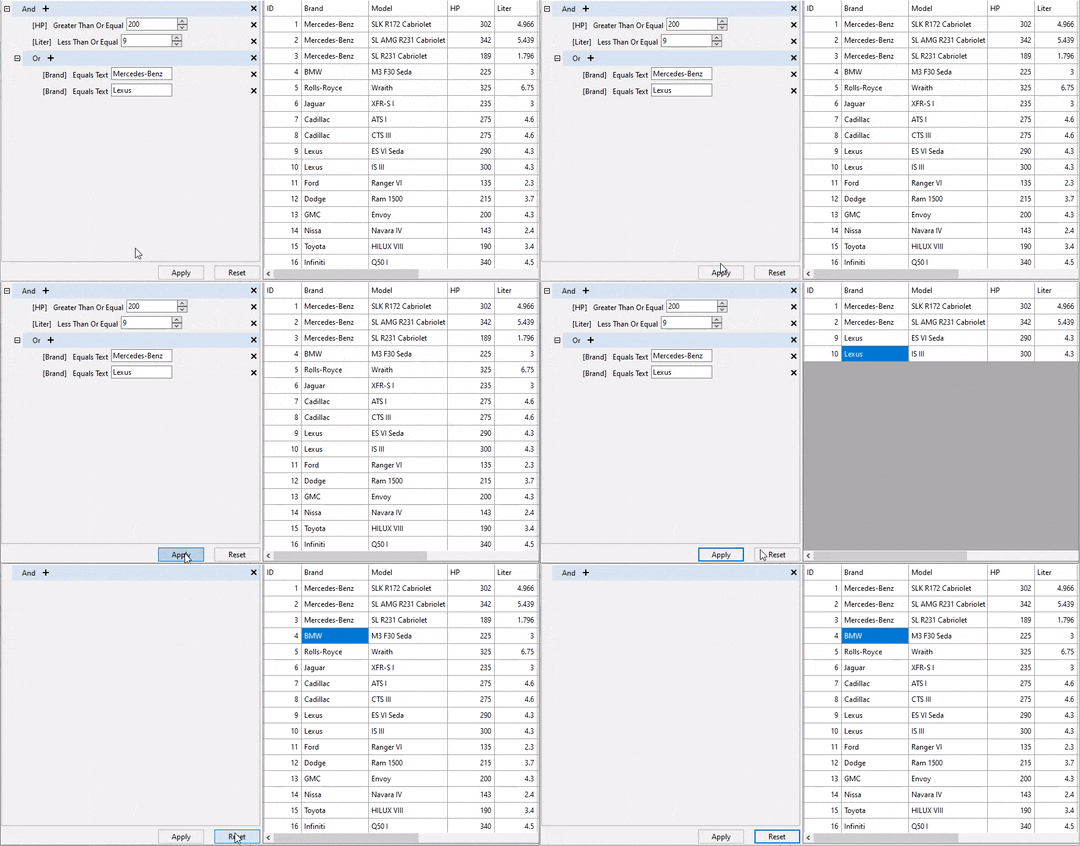
To implement apply and clear filter feature, you can use the following code example.
private void btnApply_Click(object sender, EventArgs e)
{
   filterEditor.ApplyFilterAsync();
}
private void btnReset_Click(object sender, EventArgs e)
{
   filterEditor.ClearFilter();
   filterEditor.ApplyFilterAsync();
}