Unbound reports are reports without an underlying source recordset. This type of report can be useful in two situations:
As an example of a simple unbound report, let's create a simple newsletter without a source recordset. This is done with the C1ReportDesigner application, except that you leave the ConnectionString and RecordSource properties blank and add placeholder fields to the report. The placeholder fields are simple labels whose contents will be set by an application.
Assuming you created a report with six placeholder fields named "FldHeadlineXXX" and "FldBodyXXX" (where XXX ranges from 1 to 3), you could use the following code to render the report:
To write code in Visual Basic
| Visual Basic |
Copy Code
|
|---|---|
Private Sub MakeReport()

  ' find report definition file
  Dim path As String = Application.StartupPath
  Dim i As Integer = path.IndexOf("\bin")
  If i > -1 Then path = path.Substring(0, i)
  path = path & "\"

  ' load unbound report
  c1r.Load(path & "Newsletter.xml", "NewsLetter")

  ' set field values
  c1r.Fields("FldHeadline1").Text = "C1Report Launched"
  c1r.Fields("FldBody1").Text = "ComponentOne unveils..."
  c1r.Fields("FldHeadline2").Text = "Competitive Upgrades"
  c1r.Fields("FldBody2").Text = "Get ahead ..."
  c1r.Fields("FldHeadline3").Text = "C1Report Designer"
  c1r.Fields("FldBody3").Text = "The C1Report Designer..."

  ' done, show the report
  c1ppv.Document = c1r

  ' and/or save it to an HTML document so your subscribers
  ' can get to it over the Web
  c1r.RenderToFile(path & "Newsletter.htm", FileFormatEnum.HTML)
End Sub
|
|
To write code in C#
| C# |
Copy Code
|
|---|---|
private void MakeReport()
{

  // find report definition file
   string path = Application.StartupPath;
   int i = path.IndexOf("\bin");
  if ( i > -1 ) { path = path.Substring(0, i)
  path = path + "\";

  // load unbound report
  c1r.Load(path + "Newsletter.xml", "NewsLetter");

  // set field values
  c1r.Fields["FldHeadline1"].Text = "C1Report Launched";
  c1r.Fields["FldBody1"].Text = "ComponentOne unveils...";
  c1r.Fields["FldHeadline2"].Text = "Competitive Upgrades";
  c1r.Fields["FldBody2"].Text = "get { ahead ...";
  c1r.Fields["FldHeadline3"].Text = "C1Report Designer";
  c1r.Fields["FldBody3"].Text = "The C1Report Designer...";

  // done, show the report
  c1ppv.Document = c1r;

  // and/or save it to an HTML document so your subscribers
  // can get to it over the Web

  c1r.RenderToFile(path + "Newsletter.htm", FileFormatEnum.HTML);
}
|
|
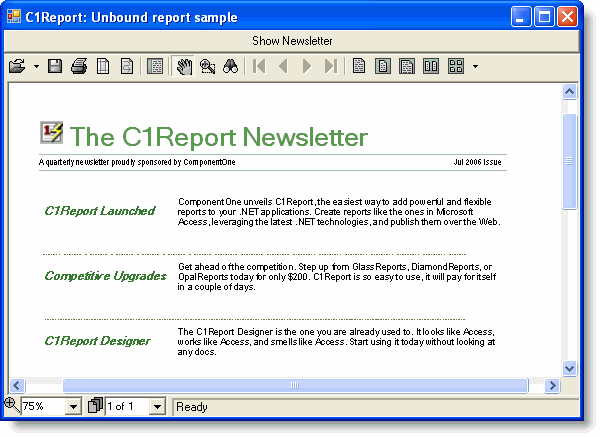
Here's what this issue of ComponentOne's newsletter looks like. Notice that our simple program does not deal with any formatting at all; it simply supplies the report contents. The report definition created with the C1ReportDesigner application takes care of all the formatting, including a headline with a logo, page footers, fonts and text positioning.
Separating format from content is one of the main advantages of unbound reports.