Posted 18 April 2023, 8:49 am EST
Hello,
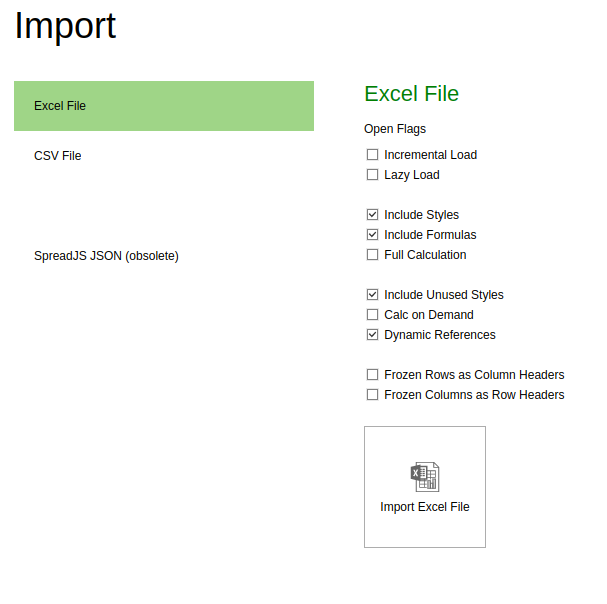
As I can understand, you want to know the import and export options that are used in SpreadJS Designer at https://www.grapecity.com/spreadjs/designer/index.html
The excel files are imported and exported with Spread IO module. In Spread IO module, spread.import() and spread.export() methods are used to import and export excel files respectively. You can specify import options in spread.import() method and export options in spread.export() method.
Spread IO module also provides spread.open() and spread.save() methods to save and open SJS format files. You can specify import and export options in these methods as well.
Please refer to the code snippet and attached sample.
    spread.export((blob) => {
        saveAs(blob, 'excel_file');
    }, console.log,
    {
        fileType: 0,
        includeBindingSource: false,
        includeStyles: true,
        includeFormulas: true,
        saveAsView: false,
        rowHeadersAsFrozenColumns: false,
        columnHeadersAsFrozenRows: false,
        includeAutoMergedCells: false,
        includeCalcModelCache: false,
        includeUnusedNames: true,
        includeEmptyRegionCells: true,
    });
Similarly, you can use import/export options in spread.import() method, spread.open() and spread.save() methods as well.
Sample: https://jscodemine.grapecity.com/share/HEqZ5g_XhEeLkyq_NyxyXQ/?defaultOpen={"OpenedFileName"%3A["%2Findex.html"%2C"%2Fsrc%2Fapp.js"]%2C"ActiveFile"%3A"%2Fsrc%2Fapp.js"}
Please let us know if you still face any difficulties.
Doc references:
spread.import():https://www.grapecity.com/spreadjs/api/classes/GC.Spread.Sheets.Workbook#import
spread.export():https://www.grapecity.com/spreadjs/api/v16/classes/GC.Spread.Sheets.Workbook#export
ExportXlsxOptions: https://www.grapecity.com/spreadjs/api/v16/modules/GC.Spread.Sheets#exportxlsxoptions
ImportXlsxOptions: https://www.grapecity.com/spreadjs/api/v16/modules/GC.Spread.Sheets#importxlsxoptions
Regards,
Ankit