Posted 15 November 2025, 6:26 am EST - Updated 15 November 2025, 8:19 am EST
Which kind of Spreadjs table should I use to build?
Posted by: khanh1985 on 15 November 2025, 6:26 am EST
-

khanh1985
-

chirag.gupta

Posted 17 November 2025, 1:51 am EST
Hi Truong,
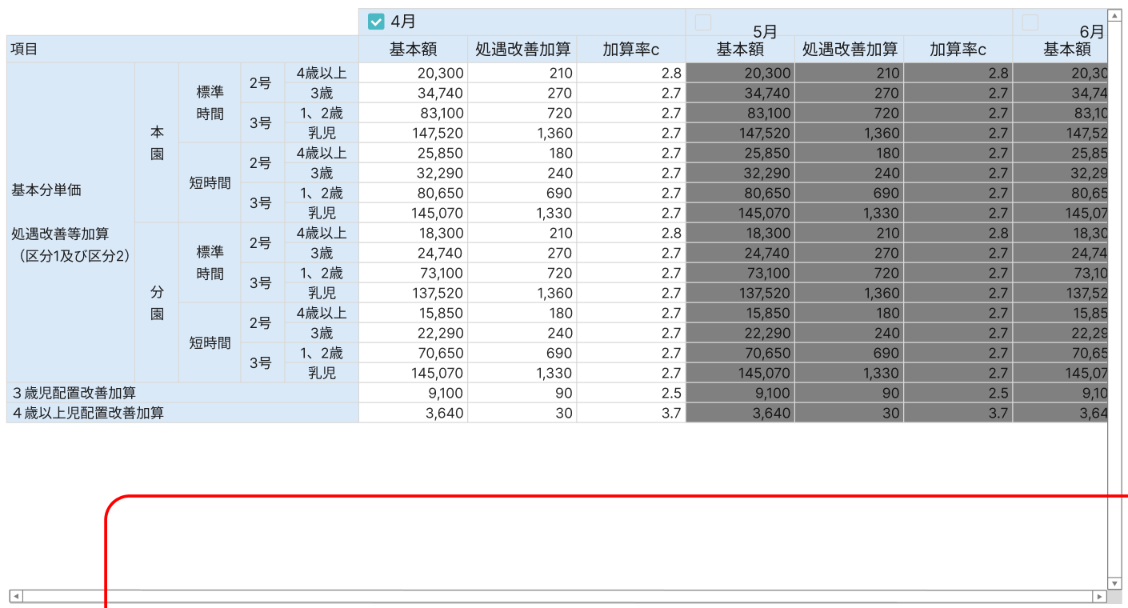
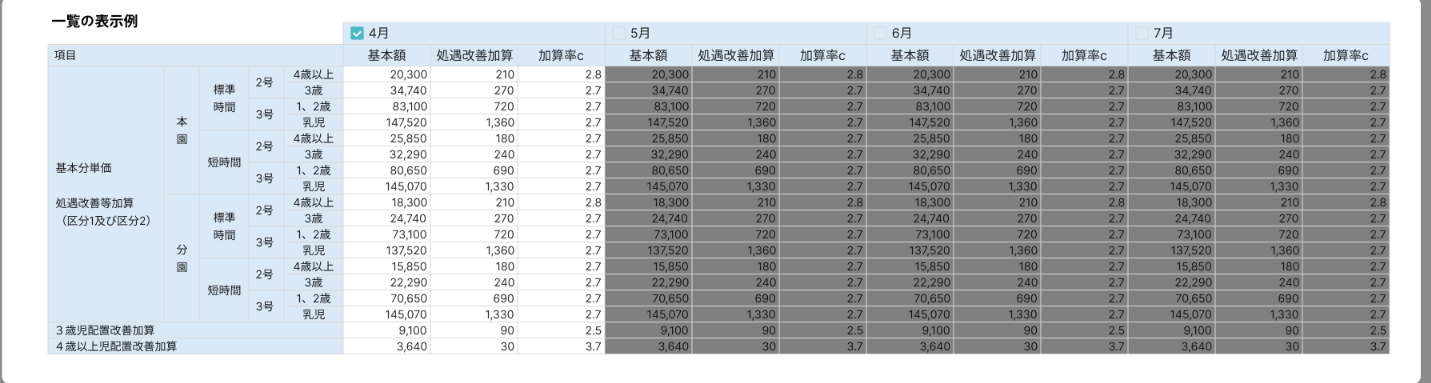
The layout shown in your screenshots includes multi-level hierarchical row headers, extensive cell merging, and repeated monthly column groups. This type of structured financial matrix is best implemented using ReportSheet, as it provides the highest flexibility for complex report-style layouts.
Below are some relevant demos that highlight how ReportSheet handles grouping, merging, custom row/column layouts, and financial-type reporting:
- https://developer.mescius.com/spreadjs/demos/features/report-sheet/data-settings/advanced-group/purejs
- https://developer.mescius.com/spreadjs/demos/features/report-sheet/rendering-features/style/purejs
- https://developer.mescius.com/spreadjs/demos/features/report-sheet/formula/use-template-cell-alias/purejs
- https://developer.mescius.com/spreadjs/demos/features/report-sheet/layout/row-layout/purejs
- https://developer.mescius.com/spreadjs/demos/features/report-sheet/showcase/cross-report/financial-report/purejs
- https://developer.mescius.com/spreadjs/demos/features/report-sheet/showcase/cross-report/quarter-sales-report/purejs
Please note that ReportSheet is an optional Add-On for SpreadJS and is not included in the standard SpreadJS license. To use ReportSheet, a SpreadJS license with the ReportSheet Add-On is required. Additional details can be found under “Optional Add-On licenses”.
To get the license for ReportSheet Add-On, you can directly connect with our sales team at:
E-mail | us.sales@mescius.com
Phone | (800) 858-2739 or (412) 681-4343 outside the U.S.A.
Fax | (412) 681-4384
Alternatively, you may also consider TableSheet, depending on the level of interactivity or editing you require. Below are some demos that demonstrate TableSheet grouping and layout capabilities:
- https://developer.mescius.com/spreadjs/demos/features/table-sheet/grouping/overview/purejs
- https://developer.mescius.com/spreadjs/demos/features/table-sheet/grouping/custom/purejs
- https://developer.mescius.com/spreadjs/demos/features/table-sheet/grouping/formula-related-field/purejs
- https://developer.mescius.com/spreadjs/demos/features/table-sheet/grouping/group-panel/purejs
Please let us know if you need further assistance.
Kind Regards,
ChiragReferences:
-
khanh1985
Posted 17 November 2025, 3:38 am EST - Updated 17 November 2025, 4:44 am EST
Hi,
Thanks for your reply, I am also expecting cell inline editing and data validation feature in table. Does ReportSheet support that ?
-
chirag.gupta
Posted 17 November 2025, 4:52 am EST
Hi Truong,
Thank you for your question!
Yes, ReportSheet fully supports data editing capabilities. Users can edit cell values directly in the report, and all changes are managed through the DataManager system.
For more details on how to implement and configure data editing in ReportSheet, please refer to the official documentation:
- https://developer.mescius.com/spreadjs/docs/features/reportsheet/reportsheet/render-mode
- https://developer.mescius.com/spreadjs/docs/features/reportsheet/data-entry
You can also refer to the following demos that represent the data entry in ReportSheet:
- https://developer.mescius.com/spreadjs/demos/features/report-sheet/data-entry/overview/purejs
- https://developer.mescius.com/spreadjs/demos/features/report-sheet/data-entry/events/purejs
Please let us know if you require any additional assistance.
Kind Regards,
Chirag