Problem with the cellEditEnded event in FlexGrid from Wijmo 5.20251.34

Posted by: kdanek on 5 November 2025, 5:18 am EST

  • Posted 5 November 2025, 5:18 am EST

    As described the cellEditEnded event in FlexGrid is triggered after a cell’s edit operation has been completed, either by committing the change or canceling it.

    I noticed that since version 5.20251.34, the cellEditEnded event stopped working correctly. I need to get the model after editing a field on the grid. I have a simple code

                                <FlexGrid ref={refFlex}className="wj-flexgrid-list"
                                    alternatingRowStep={1}
                                    showMarquee={true}
                                    allowSorting={false}
                                    headersVisibility="Column"
                                    allowResizing="ColumnsAllCells"
                                    selectionMode="Cell"
                                    autoGenerateColumns={false}
                                    isReadOnly={disableAll}
                                    cellEditEnded={cellEditEnded}
                                    itemValidator={itemValidator}
                                    validateEdits={false}
                                >
                                    <ImmutabilityProvider itemsSource={ items } />
                                </FlexGrid>
    

    Where items is declared as: items?: ItemDto ;

    Function attached to an event cellEditEnded:

    function cellEditEnded(s: wjGrid.FlexGrid, e: wjGrid.CellRangeEventArgs) {

    let item = s.selectedItems[0] as ItemDto;

    …………………

    Until version 5.20242.30, after editing a record field in FlexGrid, I received an updated model in the item. In later versions, this stopped working. The item doesn’t contain the record after editing, as if the event was triggered at the wrong time before the model was updated.

    How can I get the updated model after each field edit in newer versions of Wijmo, as my attempts have failed? Or is this a bug in Wijmo and should continue to work as it did before version 5.20251.34 , e.g., in version 5.20242.30?

  • Posted 6 November 2025, 6:56 am EST

    Hi Kdanek,

    We tried to replicate the issue on our end with the code snippets you shared, but the issue is not replicable on our end. It might be possible that some other factors in your application might be causing this issue, could you please share a small sample in which the issue can be replicated, so that we can investigate the issue further and assist you accordingly?

    Please refer to the attached sample in which we tried to replicate the issue. You can also modify the attached sample to replicate the issue and share it with us.

    In case, if there is something we missed, please let us know.

    Regards

    grid sample.zip

  • Posted 7 November 2025, 5:24 am EST - Updated 7 November 2025, 5:29 am EST

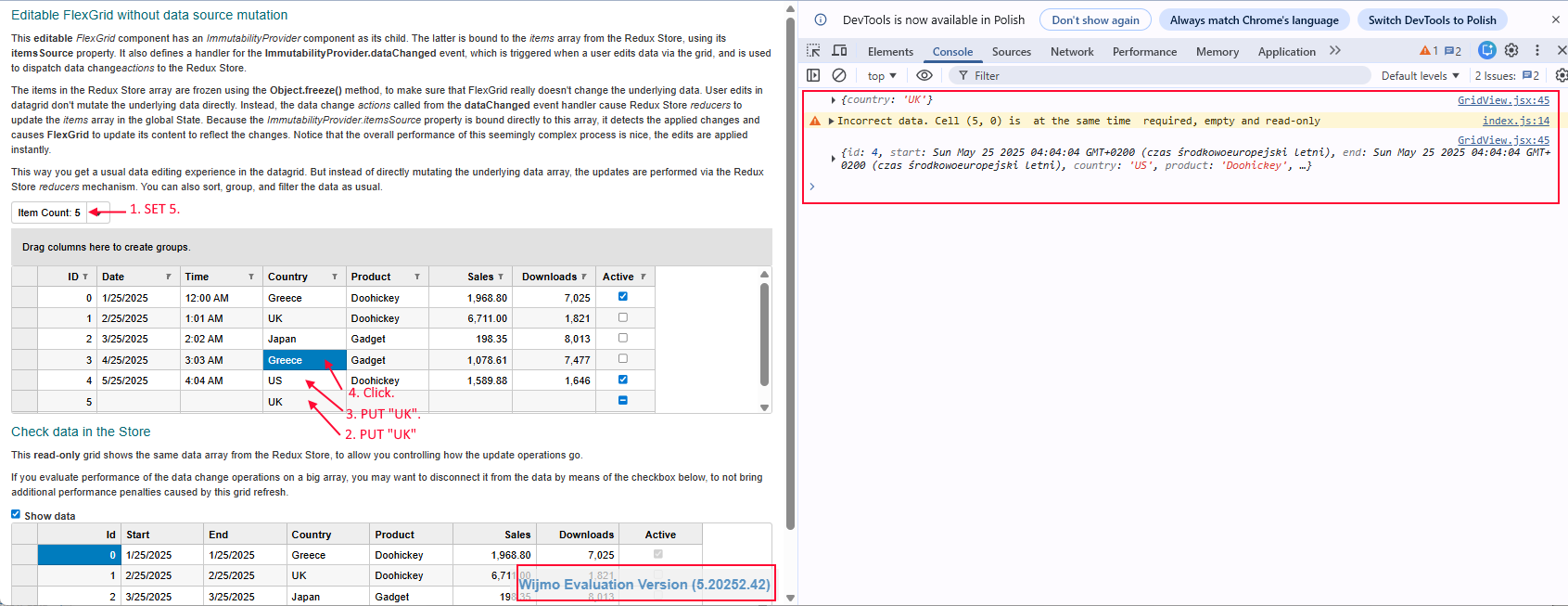
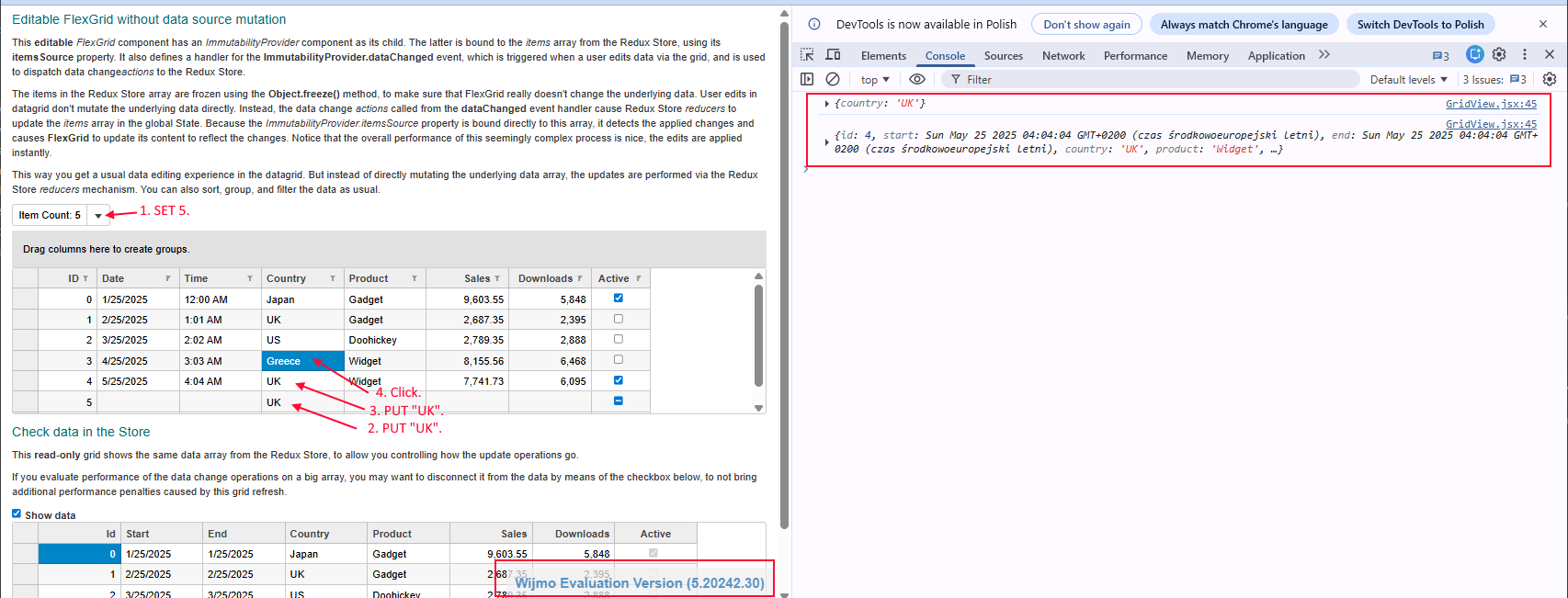
    I’ve investigated the issue, and it’s more complicated. I’ve attached an example and screenshots showing correct behavior on version 242.30 and incorrect behavior (changing the value doesn’t work under certain conditions) on version 252.42.


    Grid_Data-binding_ImmutableData_sample.zip

  • Posted 7 November 2025, 8:52 am EST

    Hi Kdanek,

    Thank you for sharing the sample. We are investigating the issue; it will take some time. We will share an update soon.

    Regards

  • Posted 10 November 2025, 1:27 am EST

    Hi Kdanek,

    We found that the ‘rowEditEnded’ event is not getting triggered when the row edit ends in the newly added row, which is causing this issue. We have forwarded this issue to the engineering team for further investigation with internal tracking ID - WJM-37158. We will update you when we have an update from the engineering team on the same.

    For now, as a workaround, you can manually trigger this event when needed. Please refer to the following code snippet -

    function onCellEditEnded(s, e) {
        let item = s.selectedItems[0];
        console.log(item);
        setTimeout(() => {
          if (e.getRow().index != s.selection.row) {
            s.onRowEditEnded(e);
          }
        });
      }

    Please find attached an updated sample demonstrating the same.

    In case, you still face any issues, please let us know.

    Regards

Need extra support?

Upgrade your support plan and get personal unlimited phone support with our customer engagement team

Learn More

Forum Channels