New Ribbon form - can't save icons

Posted by: David.Kavalir on 3 December 2019, 10:23 am EST

    • Post Options:
    • Link

    Posted 3 December 2019, 10:23 am EST - Updated 4 October 2022, 12:27 am EST

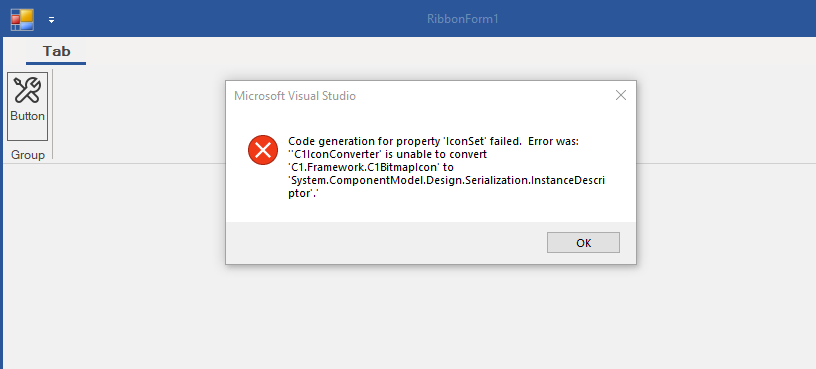
    Hi, when I create new form, add new button and select some icon, then click to save form, I get this message:

    Code generation for property ‘IconSet’ failed. Error was: ‘‘C1IconConverter’ is unable to convert ‘C1.Framework.C1BitmapIcon’ to ‘System.ComponentModel.Design.Serialization.InstanceDescriptor’.’

    Thank You, David

  • Posted 4 December 2019, 3:28 am EST

    Hello David,

    I could not observe the issue on following the same steps at my end. This was tested on a machine with 4.5.20193.393 builds installed and used in the application.

    If there is a particular version of C1Studio installed on your machine and you are picking up the ribbon related reference (C1.Win.Ribbon.4.5.2.dll) from any other local directory (where dll has another version), then the control might fail due to version conflict. Please try picking up the assembly from the installed directory and let me know if the issue persists.

    Also, share a small video showing the installed version of ComponentOne, the version used in the application and the steps performed to observe the issue.

    Regards,

    Esha

  • Posted 4 December 2019, 10:17 am EST - Updated 4 October 2022, 12:27 am EST

    Hi Esha,

    Thank You.

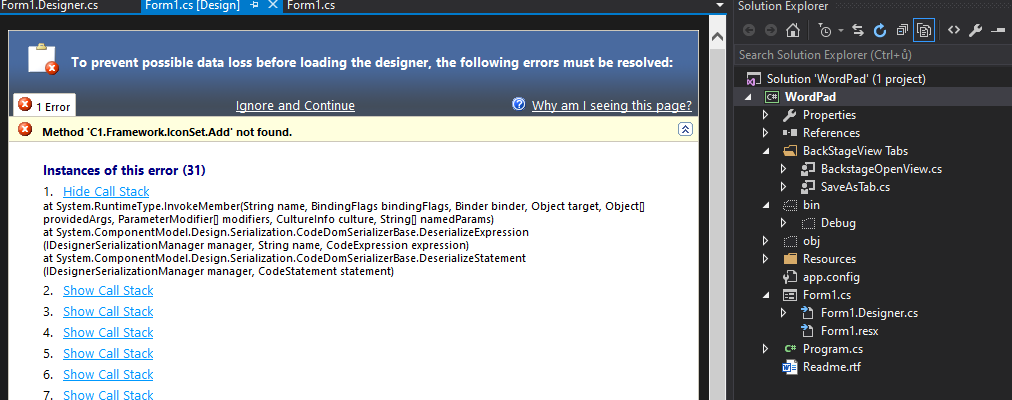
    Next problem (I think it is related). I downloaded your demo project Worpad, after click to design of Form1 form, I see designer error:

    Method C1.Framework.IconSetAdd not found

    David

  • Posted 4 December 2019, 4:33 pm EST

    Hi, after complete uninstall C1 and new installation, everything OK.

    David

  • Posted 29 November 2023, 10:17 pm EST

    Hi,

    I have the same problem. Now don’t know how to fix it. Even re-install.

    Duyet Le

  • Posted 30 November 2023, 6:07 am EST

    Hello Duyet Le,

    We have replied to your query in the recent thread of the Forum.

    Kindly consult the recent response on Forum and proceed with any further discussions there to prevent any confusion.

    Forum thread link : https://developer.mescius.com/forums/winforms-edition/c1-ribbon-can-not-use-short-cut

    Regards,

    Uttkarsh.

  • Posted 27 October 2025, 7:18 am EST

    Hi,

    After updating to the latest version of C1 Studio Winforms, I encountered the same error that David described in the 1st post.

    The code/designer worked fine with version 2018v3. According to the discussion in the linked thread, my form is derived from C1RibbonForm. However, no solution to this problem is suggested there.

    We are currently unable to edit ribbons. How can we solve this problem?

    Regards,

    Andreas

  • Posted 28 October 2025, 1:40 am EST

    Hello Andreas,

    This error typically occurs because the WinForms designer is unable to properly serialize the IconSet property of the C1BitmapIcon.

    Please try the following steps to resolve the issue:

    • Make sure all ComponentOne assemblies (especially Ribbon and Framework) are from the same version and referenced from the official installation path (C:\Program Files (x86)\MESCIUS\ComponentOne\WinForms\bin\v4.x).

    • Avoid mixing Ribbon assemblies such as C1.Win.Ribbon and C1.Win.C1Ribbon, as doing so can cause designer and version conflicts.

    • If the issue persists, try uninstalling and reinstalling ComponentOne to repair any mismatched or corrupted assemblies.

    • Test with a new WinForms project using the Ribbon control to determine if the issue is project-specific.

    If the problem continues, please share a minimal sample that replicates the behavior, along with the version of ComponentOne used in your project and the version installed on your system.

    If this information is sensitive, you can open a private support ticket here: https://developer.mescius.com/my-account/my-support/

    You can also try to set the icon in code (e.g., in the form constructor) instead of through the designer.

    Regards,

    Uttkarsh.

  • Posted 11 November 2025, 6:30 am EST - Updated 11 November 2025, 6:59 am EST

    Hi Uttkarsh,

    we encounter this issue in all of our projects. As soon as we edit a WinForm property, the error occurs when saving the form. Afterwards, all icon set-related data in the form/resx is lost and thus unusable.

    Attached is an example project (C# with Framework 4.8, compiles in x86). For security reasons, I have removed the contents of the glicx file. The project uses Nuget package references to the C1 components and we use the latest version 2025.

    Regards,

    Andreas

    C1RibbonTest.zip

  • Posted 12 November 2025, 4:50 am EST - Updated 12 November 2025, 4:56 am EST

    Hi Andreas,

    your project works for me: I make any designer change to “frmRibbon” and save it, and the icons are still there.

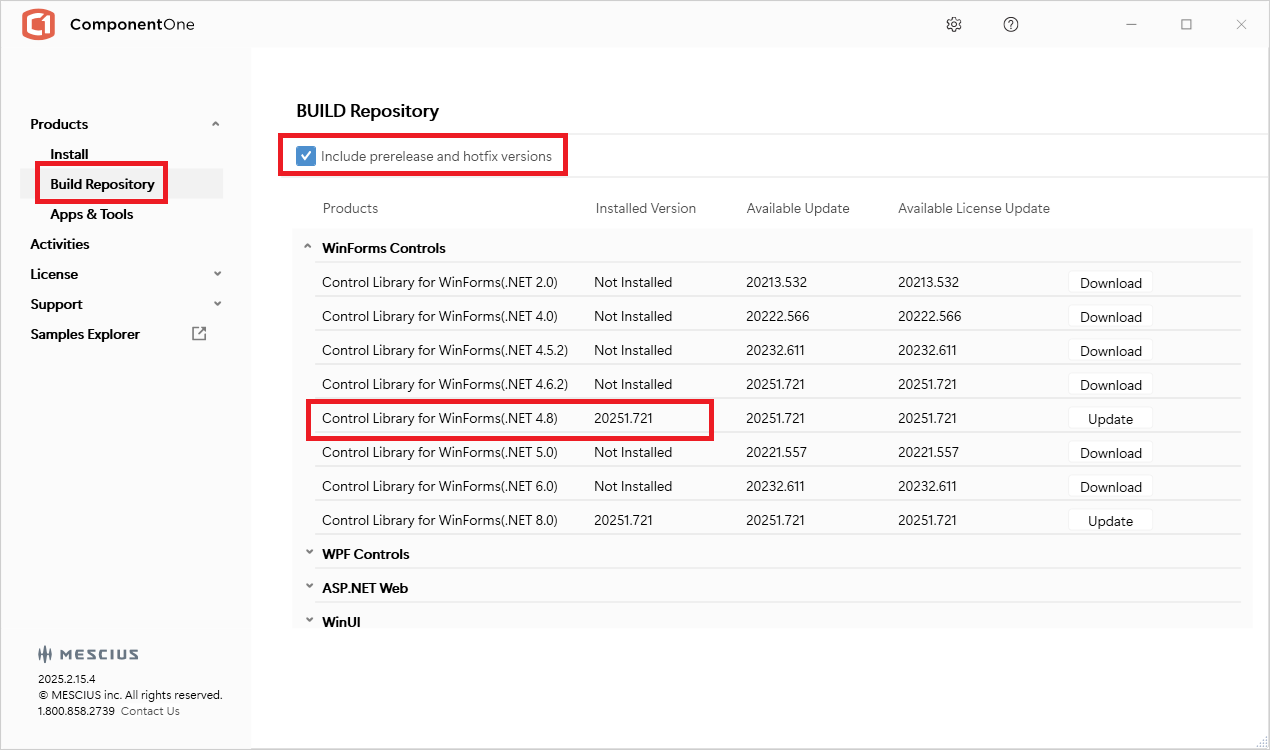
    I don’t know whether it is related, but: did you also update your C1 installation to 20251.721? In “C1ControlPanel” it should look like this:

    Hope this helps

    Wolfgang

  • Posted 12 November 2025, 6:26 am EST

    Hello Andreas,

    We reviewed your sample but couldn’t reproduce the issue.

    • Environment: C# (.NET Framework 4.8), compiled for x86.

      The shared sample was targeting Any CPU, but even after switching it to x86, the behavior didn’t occur on our end.

    Could you please perform a sanity check by deleting the bin, obj, .vs, and packages folders, then rebuild the project and open the form designer again to see if the issue persists?

    Also, let us know how you’re referencing the C1 assemblies — are they added through NuGet packages, like in the shared sample, or are you referencing them from a local folder on your system?

    Since this issue usually occurs due to version mismatches among C1 assemblies, please verify that all references come from the same folder or that all NuGet packages are of the same version.

    Furthermore, please share a screenshot of all C1 assemblies used in your project, showing their exact versions and file locations.

    P.S.: thank you Wolfgang for your inputs and verifying the sample project.

    Regards,

    Uttkarsh.

  • Posted 17 November 2025, 3:36 am EST

    Hi Uttkarsh, Hi Wolfgang,

    We use the latest versions available in the Nuget repository. However, after updating my local installation with the Control Panel, I can now edit the forms in the designer again without any errors. Thank you very much for your quick help!

    Regards,

    Andreas

Need extra support?

Upgrade your support plan and get personal unlimited phone support with our customer engagement team

Learn More

Forum Channels