


Table of Contents
PrintDocument supports the automatic generation of table of contents (TOC). The RenderToc class is used to represent the table of contents in PrintDocument. This class is derived from RenderArea and adds TOC-specific features.
The individual items within the TOC are represented by the RenderTocItem (derived from RenderParagraph). Each TOC item holds a hyperlink pointing to a location in the document so, the same mechanism is used for connecting TOC items to document content as for the hyperlinks.
The GIF below depicts the table of contents feature in PrintDocument.
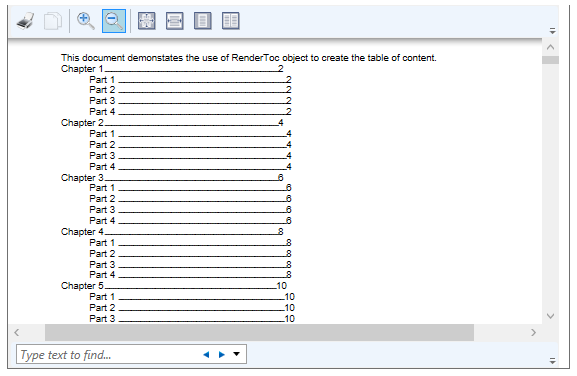
To add a table of contents to your document, do the following:
- Create an instance of the RenderToc class and add it to your document at the point where you want the TOC to appear.
- Add individual items (of the type RenderTocItem) to the RenderToc instance using the AddItem method, which provides the text of the item, the location it should point to, and optionally the level in the TOC.
- Insert RenderToc object into the document using the Insert method of the RenderObjectCollection class. The method uses two parameters, index, which indicates where to insert the object, and RenderObect which adds the object to insert, here the 'ToC'.
The code snippet below shows how to add Table of Contents to a PrintDocument.
private void Window_Loaded(object sender, RoutedEventArgs e)
{
    C1PrintDocument doc = new C1PrintDocument();
    MakeDoc1(doc);
    doc.Generate();
    documentViewer.Document = doc.FixedDocumentSequence;
}
private void MakeDoc1(C1PrintDocument doc)
{
    // create the document title
    RenderParagraph docTitle = new RenderParagraph();
    docTitle.Content.AddText("This document demonstrates the use of ");
    docTitle.Content.AddText("RenderToc");
    docTitle.Content.AddText(" object to create the table of content.");
    doc.Body.Children.Add(docTitle);
    // in this cycle we generate the document chapters, each chapter
    // has some parts, each chapter and part has an entry in the RenderToc object
    const int chapterCount = 10; // chapter count
    const int partCount = 5;     // parts count
    // generate sample text that will serve as introduction to chapter
    StringBuilder chapterIntroduction = new StringBuilder("Introduction");
    for (int i = 0; i < 40; i++)
chapterIntroduction.Append(" introduction");
    chapterIntroduction.Append(".\r\n");
    // generate sample text that will be displayed as content of part of chapter
    StringBuilder partContent = new StringBuilder("Content of part");
    for (int i = 0; i < 80; i++)
partContent.Append(" content of part");
    partContent.Append(".\r\n");
    // create an instance of RenderToc object
    RenderToc toc = new RenderToc();
    toc.BreakAfter = BreakEnum.Page;
    // Create styles for chaprters and parts
    C1.C1Preview.Style chapterTitleStyle = doc.Style.Children.Add();
    //chapterTitleStyle.Font = new Font("Verdana", 15, FontStyle.Bold);
    //chapterTitleStyle.BackColor = Color.LightSteelBlue;
    chapterTitleStyle.Spacing.Bottom = "5mm";
    C1.C1Preview.Style partTitleStyle = doc.Style.Children.Add();
    partTitleStyle.Font = new Font("Tahoma", 13);
    partTitleStyle.Spacing.Top = "3mm";
    partTitleStyle.Spacing.Bottom = "1mm";
    // loop over chapters
    for (int c = 1; c < chapterCount; c++)
    {
// each chapter will be represented as a RenderArea object
RenderArea chapter = new RenderArea();
if (c < chapterCount - 1)
    chapter.BreakAfter = BreakEnum.Page;
RenderText chapterTitle = new RenderText(string.Format("Chapter {0}", c), chapterTitleStyle);
chapter.Children.Add(chapterTitle);
chapter.Children.Add(new RenderText(chapterIntroduction.ToString(), AlignHorzEnum.Justify));
// add item for the chapter to the RenderToc
toc.AddItem(chapterTitle.Text, chapterTitle, 1);
// loop over the current chapter's parts
for (int p = 1; p < partCount; p++)
{
    RenderText partTitle = new RenderText(string.Format("Chapter {0} part {1}", c, p), partTitleStyle);
    chapter.Children.Add(partTitle);
    chapter.Children.Add(new RenderText(partContent.ToString(), AlignHorzEnum.Justify));
    // add item for the chapter part to the RenderToc
    toc.AddItem(string.Format("Part {0}", p), partTitle, 2);
}
// add the chapter to the document
doc.Body.Children.Add(chapter);
    }
    // insert the RenderToc into the document immediately after the title
    doc.Body.Children.Insert(1, toc);
}